You file a U.S. patent application online in Patent Center, the USPTO's filing system. Set up a verified account, start a new submission, enter the application data, upload your documents, calculate and pay the fees, and submit. You get a receipt with your application number on the spot.
Terman AI does not submit your application. It gets the application complete and ready, and you submit it yourself using the steps below.
Before you start
Have these ready. Missing any one of them is the usual reason a first filing stalls.
- A verified Patent Center account. Identity verification is not instant, so set it up days ahead (step 1).
- Your specification, claims and abstract as Word (DOCX) files. For a nonprovisional utility application, filing these as PDF adds a surcharge.
- Your drawings as a PDF.
- Inventor details: each inventor's legal name, mailing address and city of residence.
- Your entity status: regular, small or micro. It sets your fees (see current fees).
- A signed inventor's oath or declaration for a nonprovisional application. It can be filed later, with a surcharge.
- A payment method: credit card, USPTO deposit account or bank transfer.
Decide which application you are filing. A provisional holds your date for 12 months and is never examined. A nonprovisional is the application that can become a patent. Our guide to what goes into a patent application explains the difference.
Step 1: Set up Patent Center access
This is a one-time setup with three parts:
- Create a USPTO.gov account using your legal name.
- Verify your identity. The quick way is online through ID.me. The alternative is mailing a notarized Patent Electronic Verification form.
- Enroll in Patent Center as an independent inventor (or as a registered practitioner, if you are one).
You also need a customer number on your profile, which ties your applications to your account, and two-step sign-in turned on. Each time you sign in you enter your password and then a one-time code sent by email or an authenticator app.
Patent Center accepts filings from registered users only. Start at the USPTO's getting started page for new users.
Step 2: Practice in Training Mode
At the bottom of the Patent Center home page is a link called Enter Training Mode. It simulates a full filing. Every screen carries a "Training mode" watermark and the message "Nothing you enter is saved. There is no risk of submitting an application."
Run through it once before your real filing. It takes a few minutes and removes most surprises.
Step 3: Start a new submission
Go to patentcenter.uspto.gov and sign in. Choose New submission, then pick the application type:
- Utility Nonprovisional for a full application.
- Utility Provisional for a provisional application.
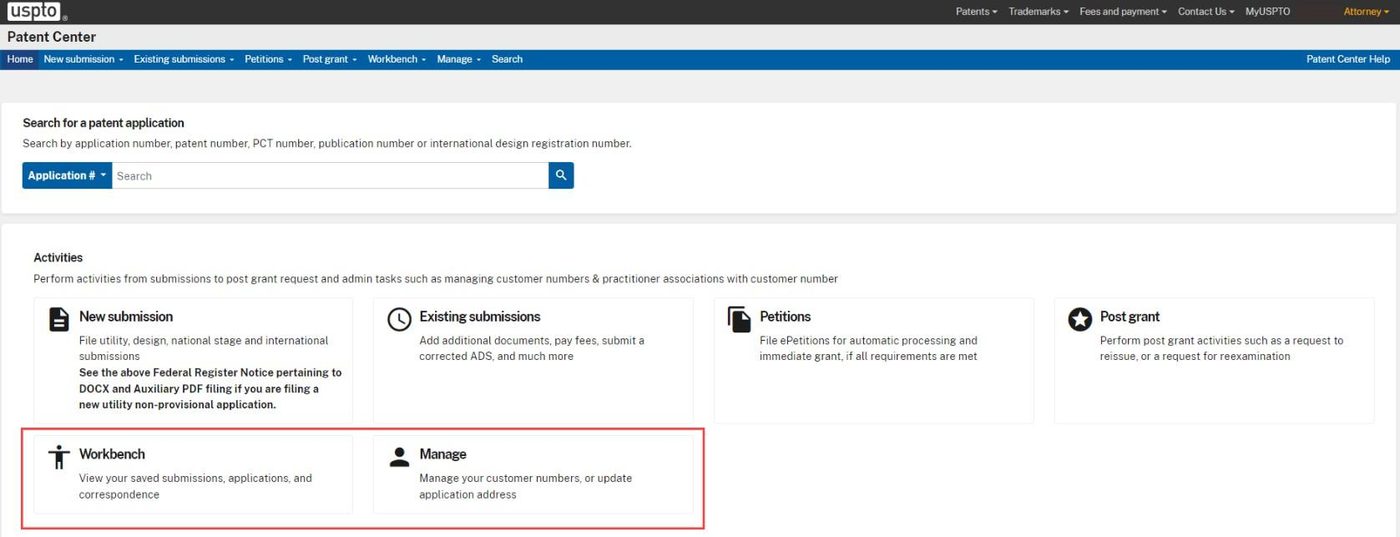
A progress bar across the top shows four stops: Application data, Upload documents, Calculate fees and Review & submit. You can move back and forth between them, and moving between stops saves your work. Saved submissions are kept for 14 days.
Step 4: Enter the application data
Patent Center asks how you want to provide the Application Data Sheet (ADS), the form that lists the inventors and basic facts. There are three choices:
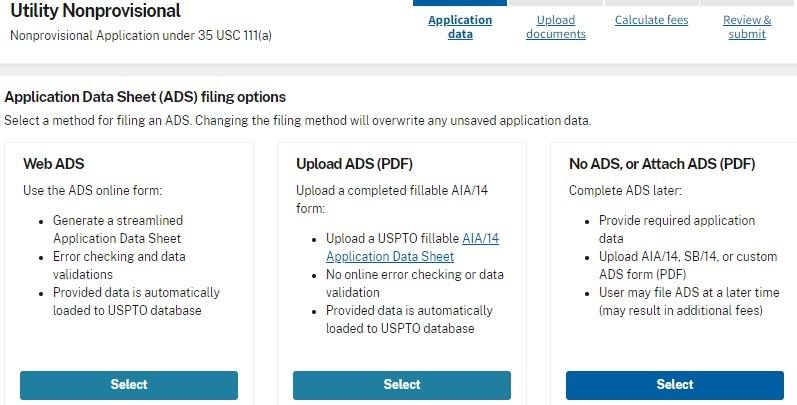
- Web ADS (recommended). You fill in an online form, and Patent Center checks it for errors as you go.
- Upload ADS (PDF). You attach a completed ADS form you prepared earlier.
- No ADS. You enter only the minimum: the title, the first inventor and a correspondence address.
Enter the title of the invention exactly as it appears on your specification, each inventor, your correspondence address and your entity status.
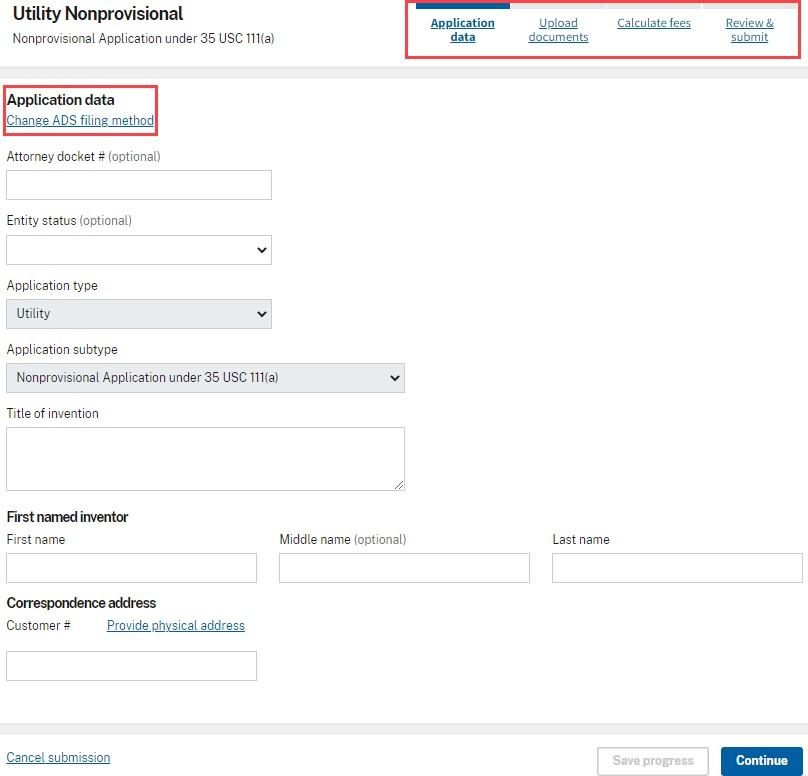
Use your customer number for the correspondence address. If you do not, the application will not appear in your Workbench after you submit it.
Step 5: Upload your documents
Drag your files onto the upload area, or use Browse files.
| Document | Format | Notes |
|---|---|---|
| Specification | DOCX | 10 MB limit per DOCX file. |
| Claims | DOCX | Not required for a provisional. |
| Abstract | DOCX | 150 words or fewer. |
| Drawings | 25 MB limit per PDF file. | |
| Oath or declaration | Nonprovisional only. One per inventor. |
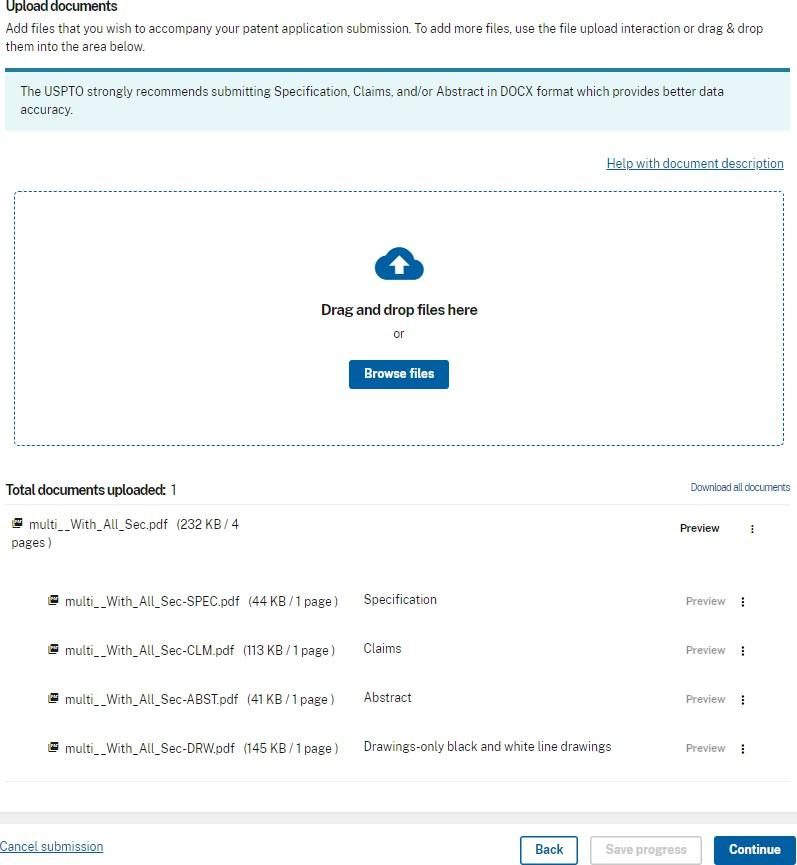
- Name your files plainly. Files with Spec, Specification, Claims, Abstract or Drawing in the name are labeled automatically.
- Check each label. Every file needs a document description. Pick one from the list if Patent Center did not detect it.
- Read the DOCX review. Patent Center validates each DOCX file and shows you the version it will keep. Read it before continuing.
- To fix a file, use the three-dot menu beside it, choose Remove, correct the file and upload it again.
You can upload up to 100 documents in one submission.
Step 6: Calculate the fees
Select your entity status, then enter the numbers Patent Center asks for: pages in the specification, total claims and independent claims. It works out the fees from those.
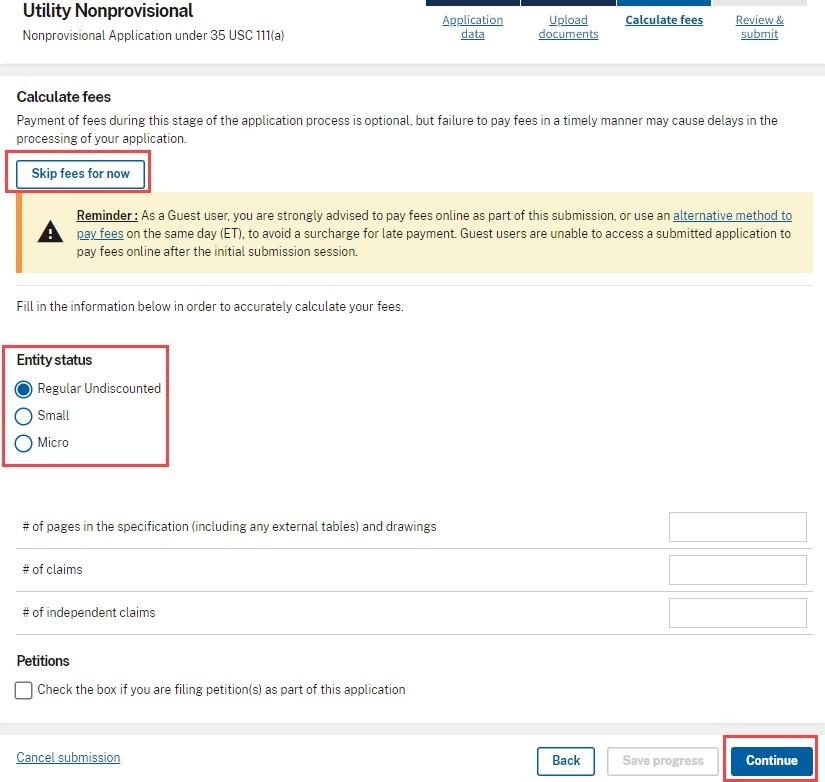
If you claim micro entity status you must also file a certification form (USPTO form PTO/SB/15A or 15B). Claiming a discount you do not qualify for can cause serious problems later, so check the definitions under current fees.
You may skip payment for now, but paying late adds a surcharge.
Step 7: Review and submit
The review screen is your last chance to correct the application data, the fees and the documents. Read it top to bottom, then submit.
You immediately get a submission receipt. It is your legal proof of the date and time of filing, and it shows your:
- application number,
- confirmation number, and
- receipt date.
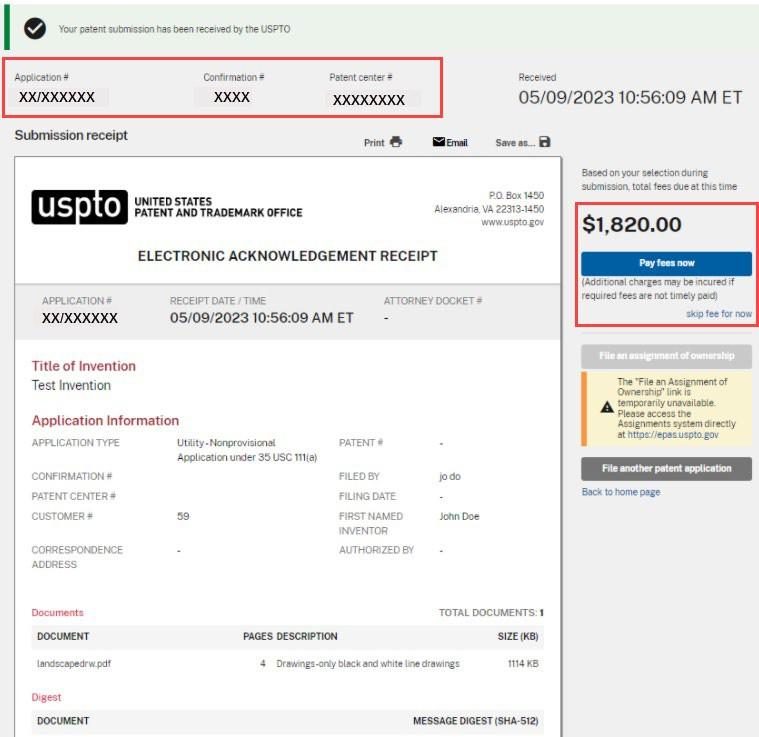
Print or save the receipt. You need both the application number and the confirmation number to file anything further in this application.
Step 8: Pay the fees
Choose Pay fees now and pay by:
- credit card (Visa, MasterCard, American Express or Discover),
- a USPTO deposit account, or
- electronic funds transfer.
After payment you return to Patent Center and receive a payment receipt with the date and time in Eastern Time. Save that too.
Current USPTO fees
These are the filing-day fees for a utility application on the USPTO fee schedule as checked on October 5, 2026. Fees change, so confirm them on the USPTO fee schedule before you file.
| Fee | Regular | Small entity | Micro entity |
|---|---|---|---|
| Basic filing fee (filed online) | $350 | $70 | $70 |
| Search fee | $770 | $308 | $154 |
| Examination fee | $880 | $352 | $176 |
| Nonprovisional total | $2,000 | $730 | $400 |
| Provisional filing fee | $325 | $130 | $65 |
| Surcharge if not filed in DOCX | $430 | $172 | $86 |
| Surcharge for late fees or declaration | $170 | $68 | $34 |
Extra fees apply if you have more than 20 claims, more than 3 independent claims, or more than 100 pages. The screenshots above come from the USPTO's own guide and show older fee amounts; use this table or the fee schedule.
Which entity are you?
- Small entity: generally individuals, businesses with 500 or fewer employees, universities and nonprofits, provided the rights are not licensed or owed to a large company.
- Micro entity: a small entity that also meets an income limit, has been named on no more than four earlier applications, and has not assigned the rights to someone over the income limit. The USPTO publishes the income limit each year.
- Regular: everyone else.
After you file
- You can say "patent pending" once the application is filed.
- An official filing receipt follows from the Office of Patent Application Processing. Check it for errors in names and title.
- If something was missing, the USPTO sends a notice with a deadline to supply it. Reply on time or the application is abandoned.
- If you filed a provisional, put the 12-month deadline in your calendar now. You must file the nonprovisional within 12 months to keep your date.
- Track everything in your Workbench in Patent Center, where correspondence from the USPTO also appears.
- Thinking of filing abroad? Foreign filing has its own deadlines and license rules. Ask a registered practitioner before you send the invention outside the United States.
Common mistakes
- Leaving identity verification to filing day.
- Uploading the specification, claims or abstract as PDF and paying the surcharge.
- Choosing provisional when you meant nonprovisional, or the reverse.
- Not using a customer number, then being unable to find the application.
- Claiming micro entity status without checking the income limit.
- Closing the browser without saving the submission receipt.
- Letting a saved, unsubmitted filing sit for more than 14 days.
Getting help
The USPTO's Patent Electronic Business Center answers questions about Patent Center. It is open Monday to Friday, 6 a.m. to midnight Eastern Time.
- Phone: 1-866-217-9197 (toll-free)
- Email: ebc@uspto.gov
For questions about what to file or whether your application is ready, talk to a registered patent attorney or agent.
Sources
- USPTO Patent Center User Guide, September 2025 (steps and screenshots)
- USPTO: Getting started, Patent Center new users
- USPTO fee schedule
This guide is general information about filing a U.S. utility patent application, checked against the USPTO sources above on October 5, 2026. It is not legal advice. Patent Center and USPTO fees change, so confirm the details with the USPTO or a registered patent practitioner before you file. Screenshots are from the USPTO's Patent Center User Guide; Terman AI is not affiliated with the USPTO.